Top AI Image Generators for Branding in 2026: 7 Models Tested
We gave one logo and one prompt to Nano Banana, ChatGPT Image 2.0 and 2.6, Qwen, Grok Imagine, Seedream 5.5, and Wan2.7. Compare the branding mockups, speed, and cost.
AI image generators have become one of the fastest ways to see a brand come to life. Upload a logo, describe a scene, and in seconds you have a storefront, a product shot, or a social post that looks like your business already exists. But there are now dozens of models, and they don't all handle logos the same way.
So we ran a simple test. We took one real logo, wrote one prompt, and gave it to seven of today's top AI image generators in LogoAI's multi-model AI image editor, including the brand-new ChatGPT Image 2.6. Then we compared the results, the speed, and the cost of each.
The Test: One Logo, One Prompt, Seven Models
Our test brand is Posh Pets, an upscale dog and cat grooming salon. Its logo is a good challenge for AI: an elegant serif wordmark, a playful paw print hidden in the "o," soap bubbles, and small curved text that reads "Dog and Cat Grooming."
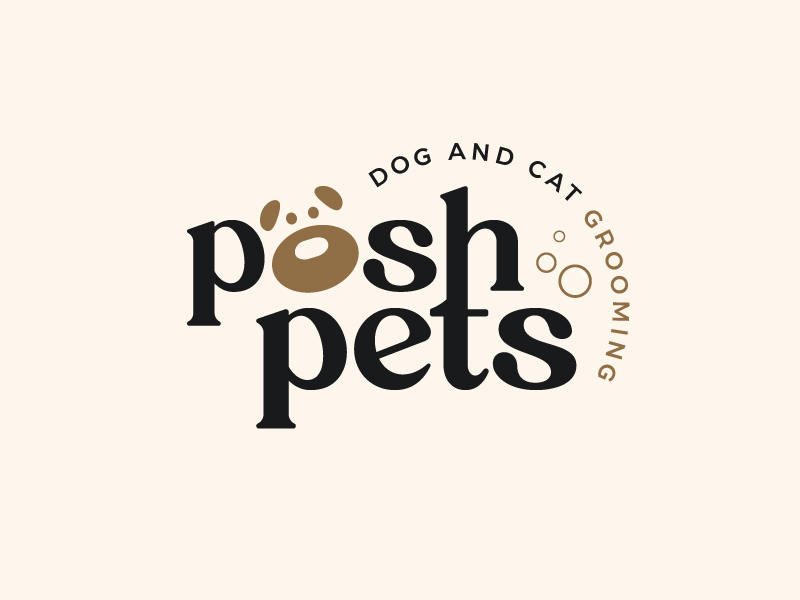
We asked each model for the same branding mockup:
Prompt: Create a photorealistic brand mockup for Posh Pets, an upscale dog and cat grooming salon. Show the attached logo printed large on the clean front window of a bright, modern boutique grooming salon, with a freshly groomed fluffy white dog sitting inside near the window. Warm natural light, cream and soft brown tones that match the logo. Keep the logo design, text, spelling, and colors exactly the same as the attached image.
Six images were generated together in a single run with the logo attached as a reference, at a 16:9 aspect ratio and standard quality. We added the newest model, ChatGPT Image 2.6, with the exact same prompt, logo, and settings a few minutes later. We timed each one from the moment we clicked generate until the finished image was ready.
Results at a Glance
| Model | Time | Credits | Output size | Logo accuracy | Best for |
|---|---|---|---|---|---|
| Grok Imagine 2 | 14.6 s | 4 | 1792 × 1008 | Excellent | Bright, high-resolution scenes, fast |
| Wan2.7 Image | 14.6 s | 5 | 1280 × 720 | Good, one letter hidden | Quick drafts |
| Seedream 5.5 | 20.9 s | 5 | 1424 × 800 | Excellent | Realistic storefronts and spaces |
| Qwen Image 2.1 | 21.3 s | 4 | 1376 × 768 | Excellent, lighter brown | Natural, documentary-style photos |
| Nano Banana 2.0 Lite | 25.9 s | 3 | 1376 × 768 | Excellent | Clean mockups on a budget |
| ChatGPT Image 2.6 | 51.9 s | 5 | 1672 × 941 | Wordmark good, tagline errors | Warm, detailed scenes |
| ChatGPT Image 2.0 | 56.9 s | 3 | 1672 × 941 | Excellent | Rich, warm lifestyle scenes |
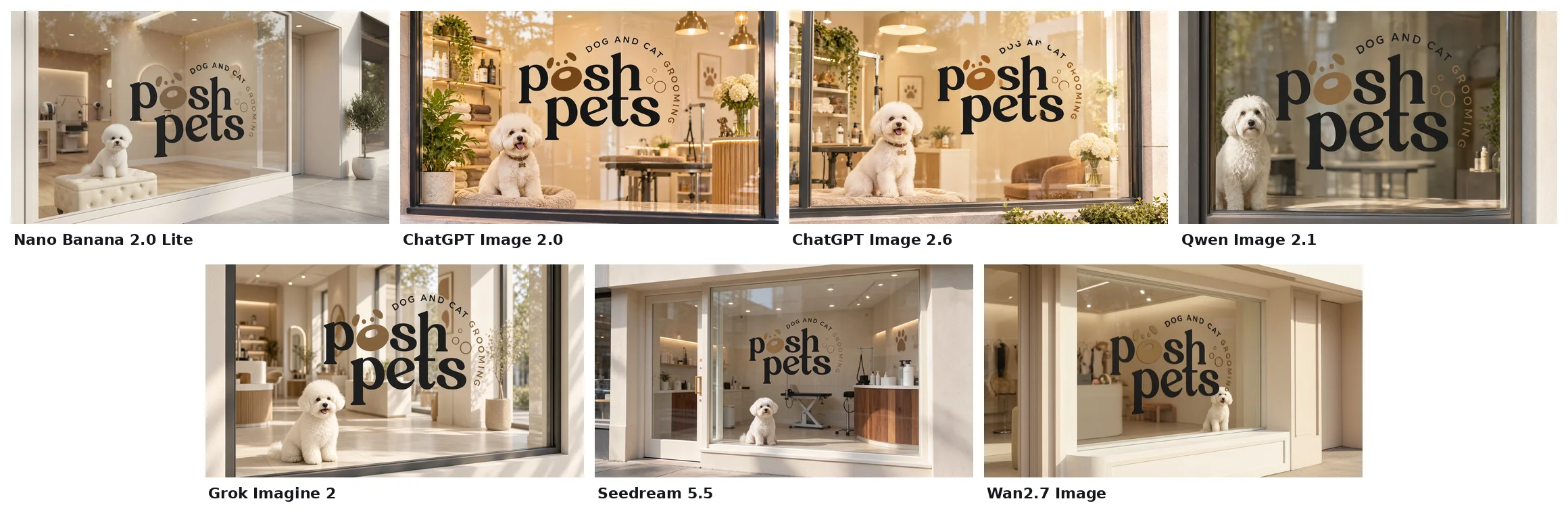
Six of the seven models got the hardest part right: the Posh Pets wordmark, the paw print, and the curved tagline came through without spelling mistakes. The surprise was the newest model, ChatGPT Image 2.6, which kept the main wordmark but slipped on the small curved text. Beyond accuracy, the differences were in the scene around the logo, the colors, the speed, and the resolution.
1. Nano Banana 2.0 Lite: Best Value
25.9 seconds · 3 credits · 1376 × 768
Google's Nano Banana 2.0 Lite produced a clean, calm boutique with the logo applied as a crisp window decal and a bichon sitting on a tufted ottoman. The cream and brown palette matches the brand perfectly, and the logo is accurate down to the bubbles.
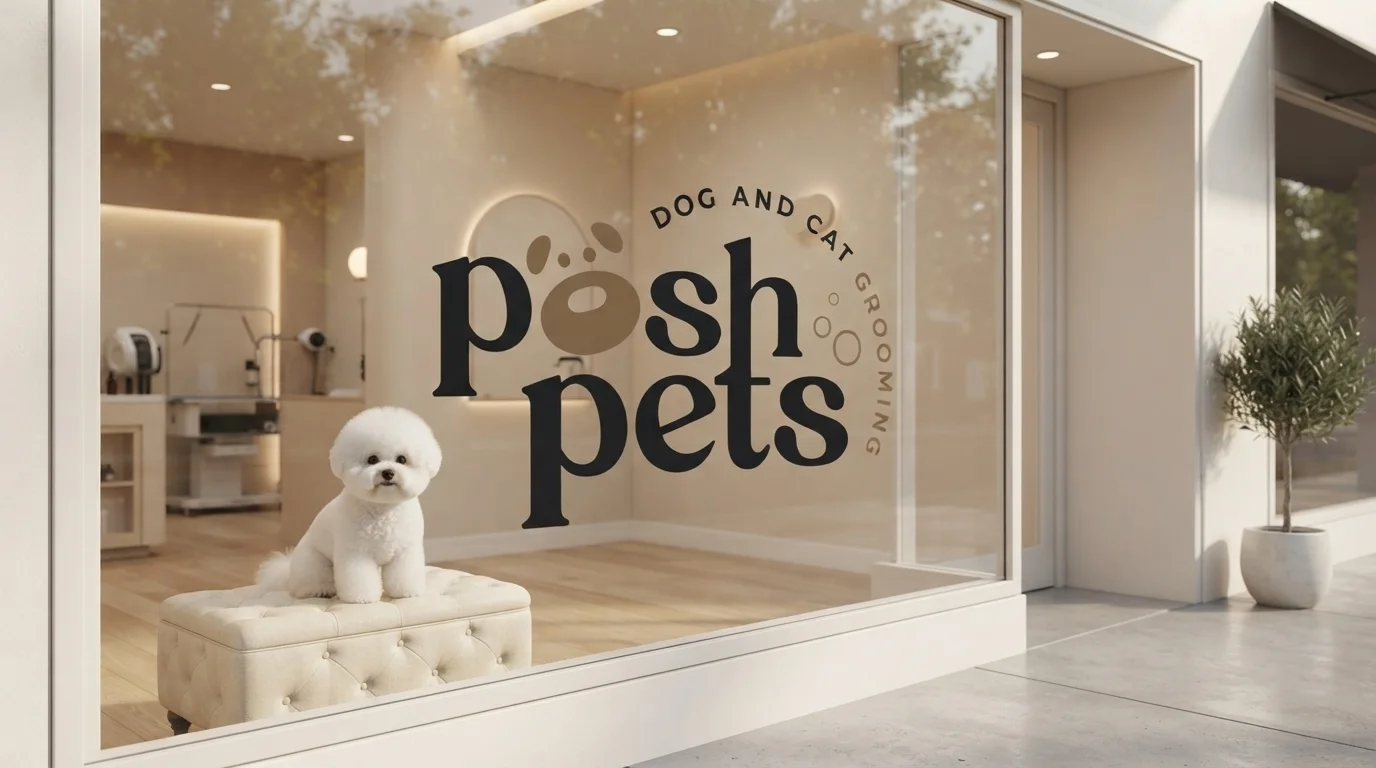
Verdict: For 3 credits, this is hard to beat. A great default for quick, on-brand mockups. Try it in the Nano Banana image generator.
2. ChatGPT Image 2.0: Best Lifestyle Scene
56.9 seconds · 3 credits · 1672 × 941
ChatGPT Image 2.0 told the richest story. Shelves of shampoo and folded towels, a grooming table, hanging pendant lights, flowers, and a happy poodle on a plush bed, all bathed in warm golden light. The logo is large, accurate, and perfectly placed.
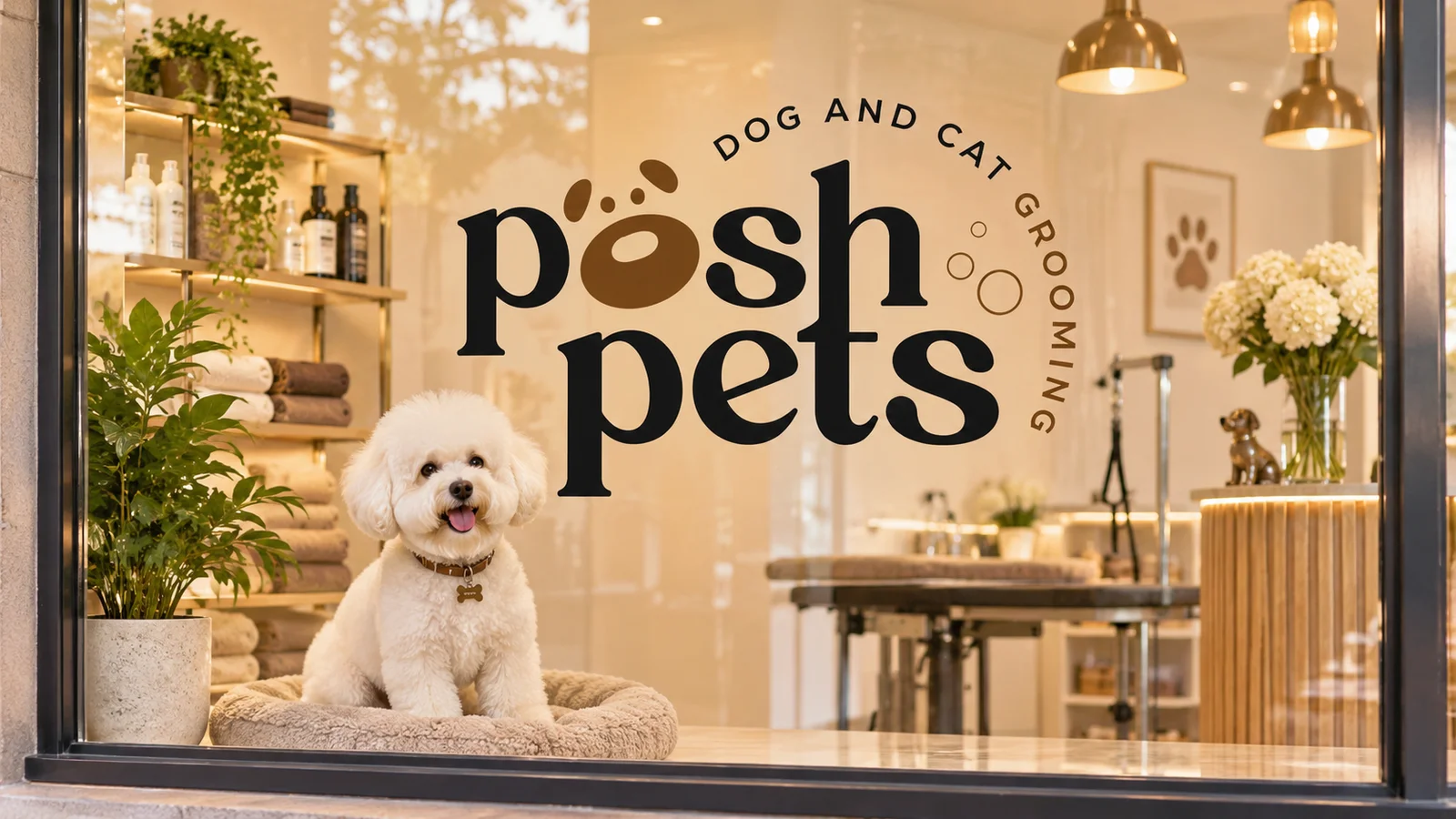
Verdict: The most "finished" lifestyle image in the test, at the same low price as Nano Banana Lite. The trade-off is speed: it took almost a minute. Try it in the ChatGPT image generator.
3. ChatGPT Image 2.6: Newest Model, Small-Text Slips
51.9 seconds · 5 credits · 1672 × 941
ChatGPT Image 2.6 is the newest model in the test, so we added it to the mix. Its scene is just as warm and detailed as ChatGPT Image 2.0's: pendant lights, shelves of products, a paw print frame, an armchair, flowers, and a smiling bichon with a bone-shaped tag. The big "posh pets" wordmark and paw print are spot on.
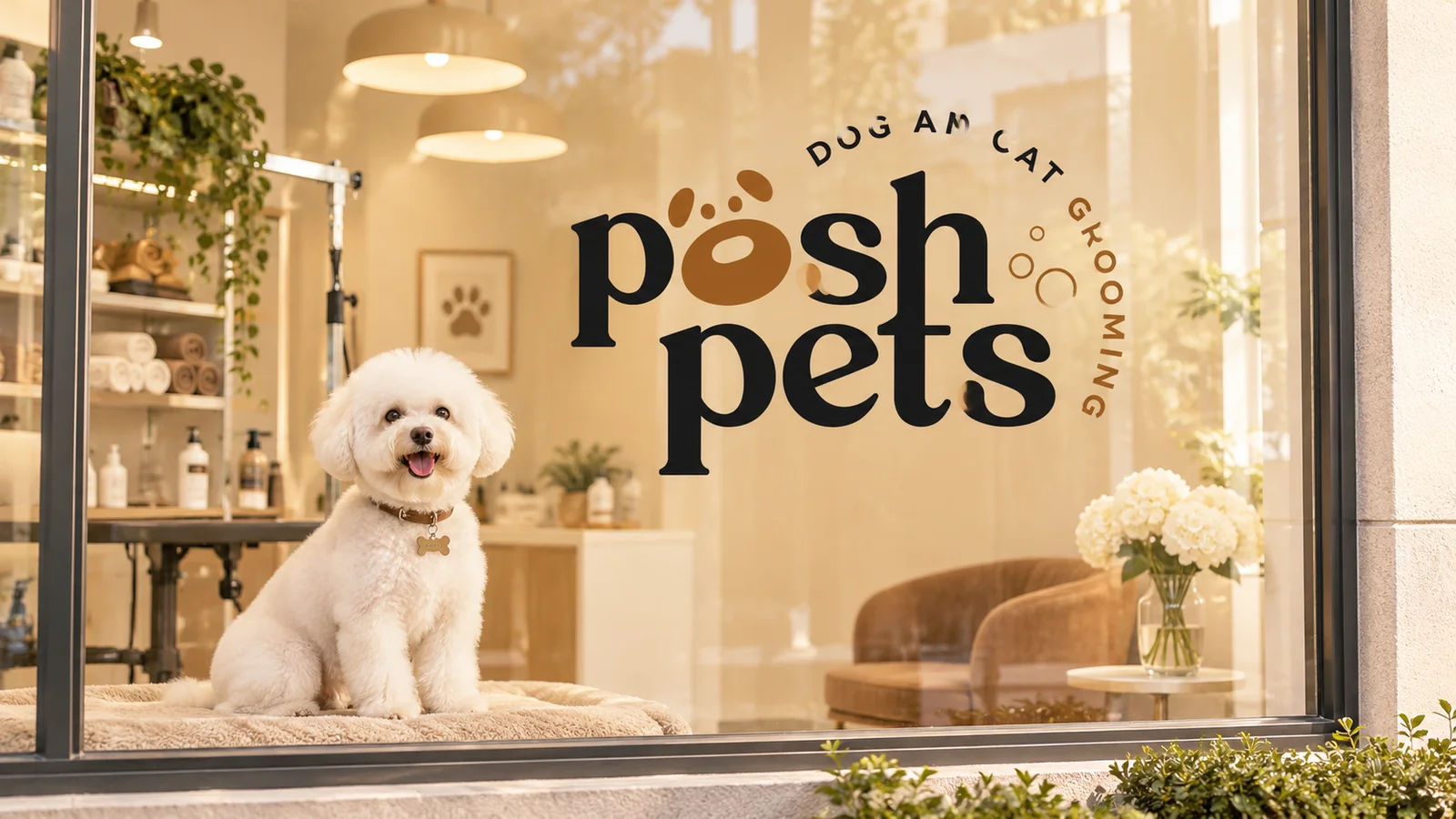
Up close, though, the small curved tagline reads "Dog An Cat" instead of "Dog and Cat," and a few letters have faint smudges where the window glass and the decal blend together.
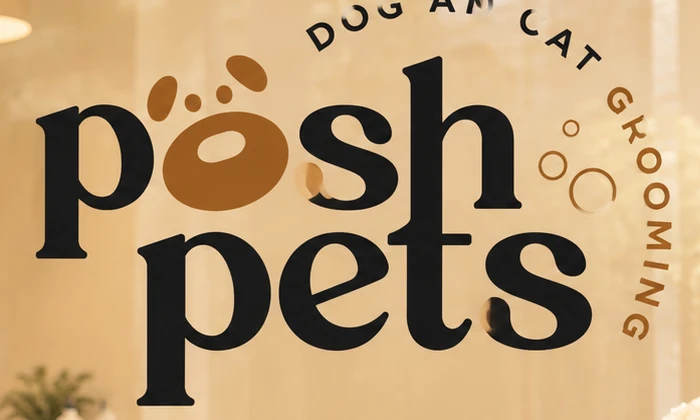
Verdict: A beautiful scene and a bit faster than ChatGPT Image 2.0 in our test, but it costs more and was the only model to misspell part of the logo. Check small text carefully, or regenerate. Try the ChatGPT Image 2.6 generator and pick 2.6 from the model menu.
4. Qwen Image 2.1: Most Natural Photo
21.3 seconds · 4 credits · 1376 × 768
Qwen Image 2.1 created the most documentary-looking photo: soft daylight, a slightly blurred interior, and a shaggy white dog looking out the window. The logo is accurate, though the brown paw print came out a lighter tan than the original.
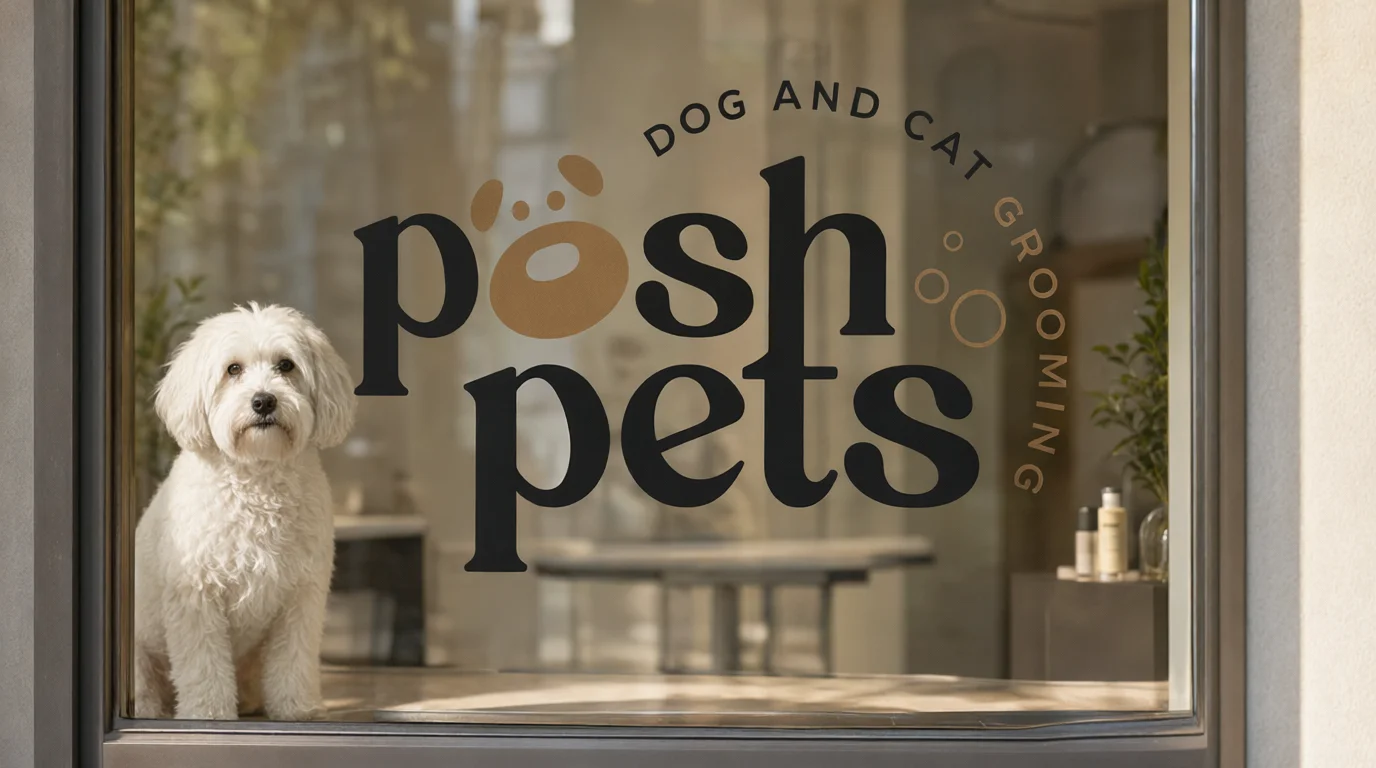
Verdict: A good pick when you want realism over polish. Check colors closely if exact brand tones matter. Try it in the Qwen image generator.
5. Grok Imagine 2: Fastest With the Highest Resolution
14.6 seconds · 4 credits · 1792 × 1008
Grok Imagine 2 tied for the fastest result and delivered the largest image in the test. The scene is bright and airy, with sunlight streaming across the floor, and the logo is large, sharp, and accurate. The bichon is especially convincing.
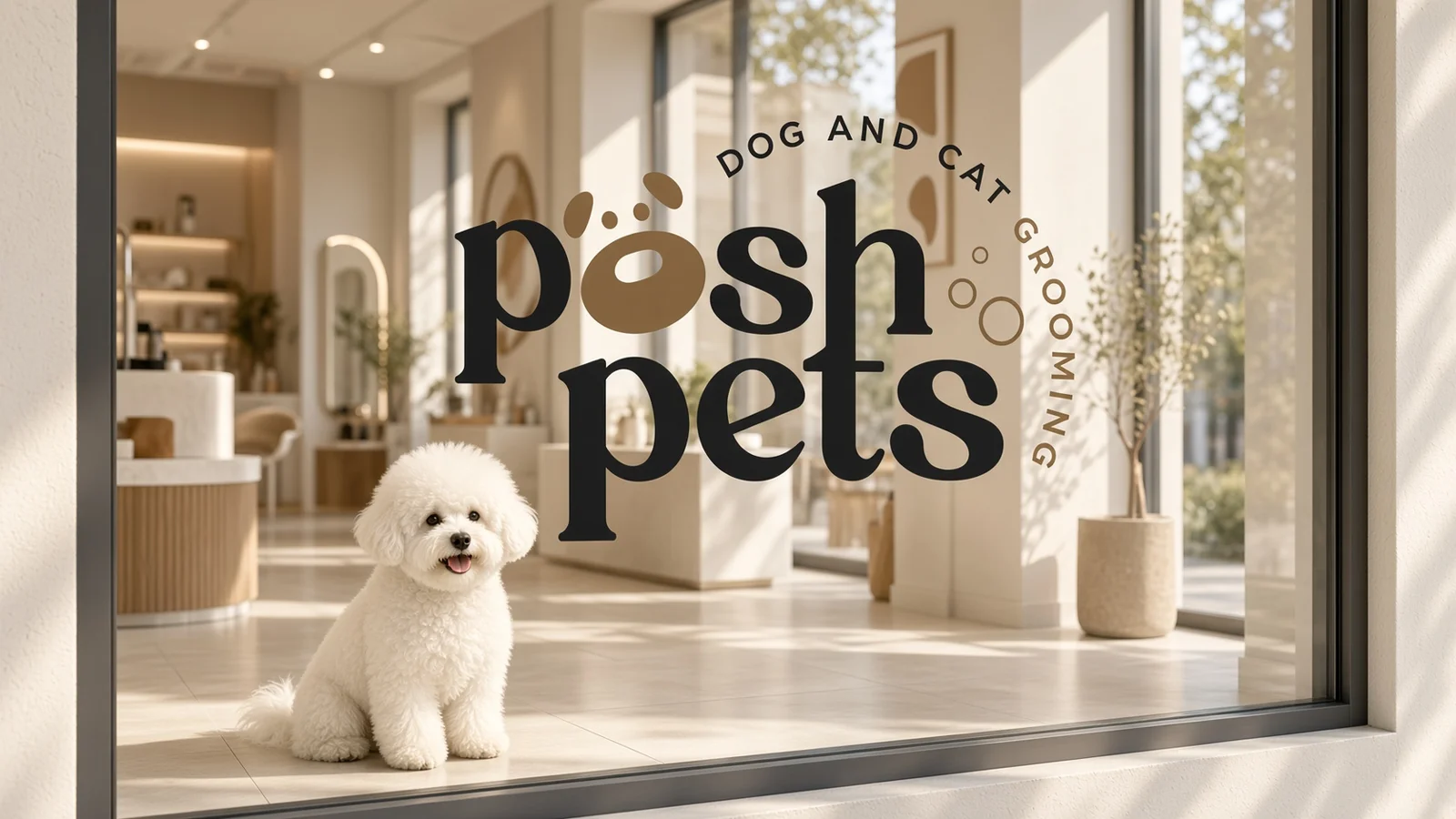
Verdict: The best balance of speed, quality, and resolution. Ideal for website banners and social headers. Try it in the Grok image generator.
6. Seedream 5.5: Most Realistic Storefront
20.9 seconds · 5 credits · 1424 × 800
Seedream 5.5, the newest Seedream model, was the only one to show the full storefront: the glass door, the window frame, and a believable grooming salon inside with a grooming table, a wooden counter, and product bottles. The logo is accurate and sized like a real window graphic.
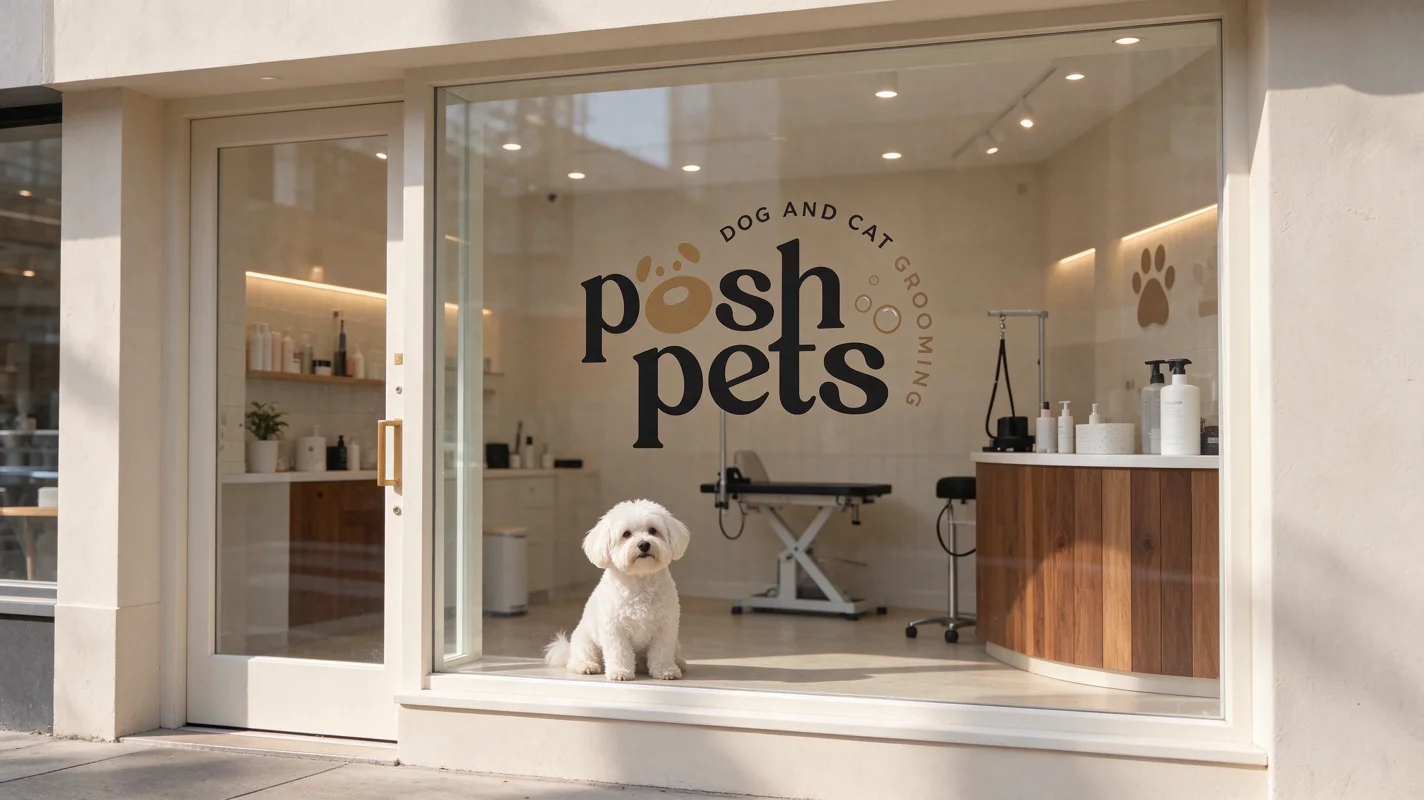
Verdict: The most believable "this business is real" image. Great for pitch decks and signage previews. Try it in the Seedream image generator.
7. Wan2.7 Image: Fast, But Less on Brief
14.6 seconds · 5 credits · 1280 × 720
Wan2.7 Image tied Grok for speed, and its logo is accurate. But it missed parts of the brief: the dog sits in front of the curved text and hides the last letter of "Grooming," and the interior looks more like a clothing boutique than a grooming salon.
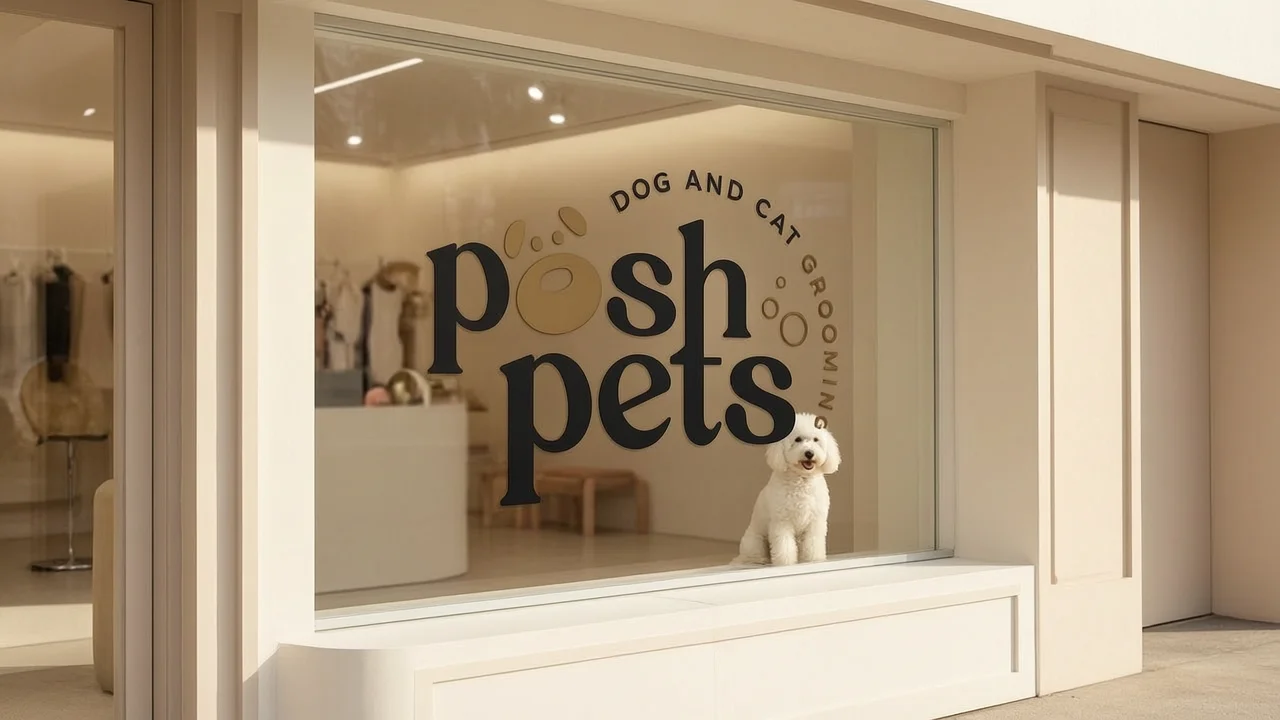
Verdict: Fine for quick drafts, but the lowest resolution and the least on-brand scene in this test. Try it in the Wan image generator.
Speed Compared
| Rank | Model | Time to finished image |
|---|---|---|
| 1 | Grok Imagine 2 | 14.6 s |
| 1 | Wan2.7 Image | 14.6 s |
| 3 | Seedream 5.5 | 20.9 s |
| 4 | Qwen Image 2.1 | 21.3 s |
| 5 | Nano Banana 2.0 Lite | 25.9 s |
| 6 | ChatGPT Image 2.6 | 51.9 s |
| 7 | ChatGPT Image 2.0 | 56.9 s |
Five of the seven models finished in under 30 seconds. Both ChatGPT models took about twice as long as the rest, with ChatGPT Image 2.6 a little faster than 2.0. Speeds vary from run to run, but ChatGPT Image 2.0 was also the slowest of this group in our earlier benchmarks and in a second test run.
Cost Compared
| Model | Credits per image |
|---|---|
| Nano Banana 2.0 Lite | 3 |
| ChatGPT Image 2.0 | 3 |
| Qwen Image 2.1 | 4 |
| Grok Imagine 2 | 4 |
| Seedream 5.5 | 5 |
| Wan2.7 Image | 5 |
| ChatGPT Image 2.6 | 5 |
Generating all seven images cost 29 credits in total. The two cheapest models, Nano Banana 2.0 Lite and ChatGPT Image 2.0, both produced excellent results, which shows that a higher price doesn't always mean a better branding mockup.
Our Picks
- Best overall for branding: Grok Imagine 2. Fast, accurate, and the highest resolution.
- Best lifestyle and social content: ChatGPT Image 2.0, if you can wait a minute.
- Best value: Nano Banana 2.0 Lite. Excellent quality for 3 credits.
- Most realistic storefront and signage: Seedream 5.5.
- Most natural photo look: Qwen Image 2.1.
- Newest model to watch: ChatGPT Image 2.6. A gorgeous scene, but check the small text.
Tips for Better AI Branding Mockups
- Attach your logo. A reference image keeps the design accurate. Describing your logo in words alone rarely works.
- Say "keep the logo exactly the same." Asking the model to keep the design, text, spelling, and colors unchanged makes a visible difference.
- Name your brand colors in the prompt. "Cream and soft brown tones" helped every model match the Posh Pets palette.
- Describe the scene, not just the object. Light, setting, and props turn a flat mockup into a believable brand moment.
- Compare models side by side. Each model has a different style. Running several at once is the fastest way to find the one that fits your brand.
Frequently Asked Questions
What is the best AI image generator for branding in 2026? In our test, Grok Imagine 2 offered the best mix of speed, accuracy, and resolution, while ChatGPT Image 2.0 created the richest lifestyle scene. The best choice depends on what you're making.
Which AI image generator is the most accurate with logos? With the logo attached as a reference, six of the seven models reproduced the Posh Pets logo accurately. ChatGPT Image 2.6 kept the main wordmark but misspelled the small tagline. Nano Banana 2.0 Lite, ChatGPT Image 2.0, Grok Imagine 2, and Seedream 5.5 also matched the brand colors closely.
Which AI image generator is the fastest? Grok Imagine 2 and Wan2.7 Image both finished in 14.6 seconds. ChatGPT Image 2.0 was the slowest at 56.9 seconds.
Which is the cheapest? Nano Banana 2.0 Lite and ChatGPT Image 2.0 cost 3 credits per image, the lowest in this test.
Is ChatGPT Image 2.6 better than ChatGPT Image 2.0? Not for logo mockups in our test. Both created rich, warm scenes, and 2.6 was a few seconds faster, but 2.0 kept every letter of the logo correct and costs 3 credits instead of 5.
Can I compare several AI image generators at once? Yes. LogoAI's AI image editor has a Multi-Model mode that sends one prompt and one reference image to several models at the same time, so you can compare the results side by side.
Try It With Your Own Logo
The best way to choose an AI image generator is to see what each one does with your brand. Compare the top AI image models with your logo in one click.
Don't have a logo yet? Create one with the AI logo maker, then bring it to life in a branded mockup.
Ready to create your own logo?
Turn your brand name into professional logo concepts in seconds with LogoAI.
Generate my logo