How to Turn an Image into a Logo Design with AI
Turn a photo into logo ideas with LogoAI Image to Logo. Follow a real tennis-photo example, from uploading the image to comparing six Ace Tennis designs.
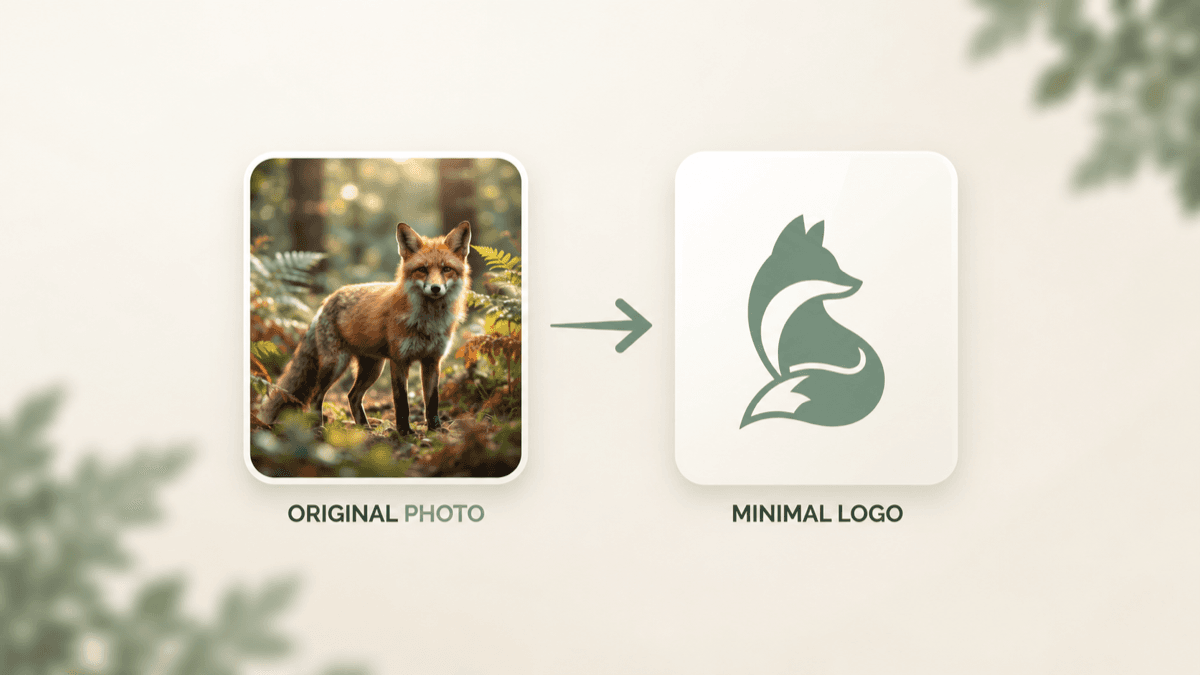
A great logo idea can start with a picture you already have: a favorite animal, a sketch in your notebook, or a photo of yourself doing something you love. The challenge is turning that image into a design that feels like a brand, with a clear subject, deliberate shapes, and readable lettering.
Our new Image to Logo tool gives you a starting point. Upload an image and explore logo concepts inspired by it. In this walkthrough, I’ll use a photo of myself playing tennis to show how one personal image becomes several directions for a brand called Ace Tennis.
What does it mean to turn an image into a logo?
A photograph records a scene. A logo selects the parts of that scene that help people recognize an idea. Backgrounds, lighting, textures, and small details can be reduced or reinterpreted, while a distinctive shape or subject becomes the focus.
The fox example in our cover shows this transformation. The original photograph contains foliage, fur, and natural light. The logo keeps the pointed ears, curved body, and flowing tail, expressing the animal through a small collection of shapes and one color.
For a tennis brand, the useful ingredients might be a player’s silhouette, a racket, or the sense of movement. You are creating a visual interpretation of the photo, so expect changes in pose, clothing, and composition as different concepts emerge.
Step 1: Choose a photo with a clear subject
For this example, I started with a photo of myself on a tennis court, holding a racket and preparing to play. The racket, visor, and athletic stance communicate tennis immediately. Those details give the design a direction before a brand name is added.
Choose a picture where your main subject is easy to distinguish. An animal’s profile, a recognizable object, or a person with a clear pose can provide useful shapes. If the subject occupies only a tiny corner, crop closer before uploading, while leaving important features intact.
You do not need a studio photograph. Prioritize a clear subject and a meaningful connection to the brand you want to create.
Step 2: Upload your image and add a brand name
Open LogoAI Image to Logo and upload or paste your image. The tool accepts PNG, JPG, and WebP files up to 8 MB.
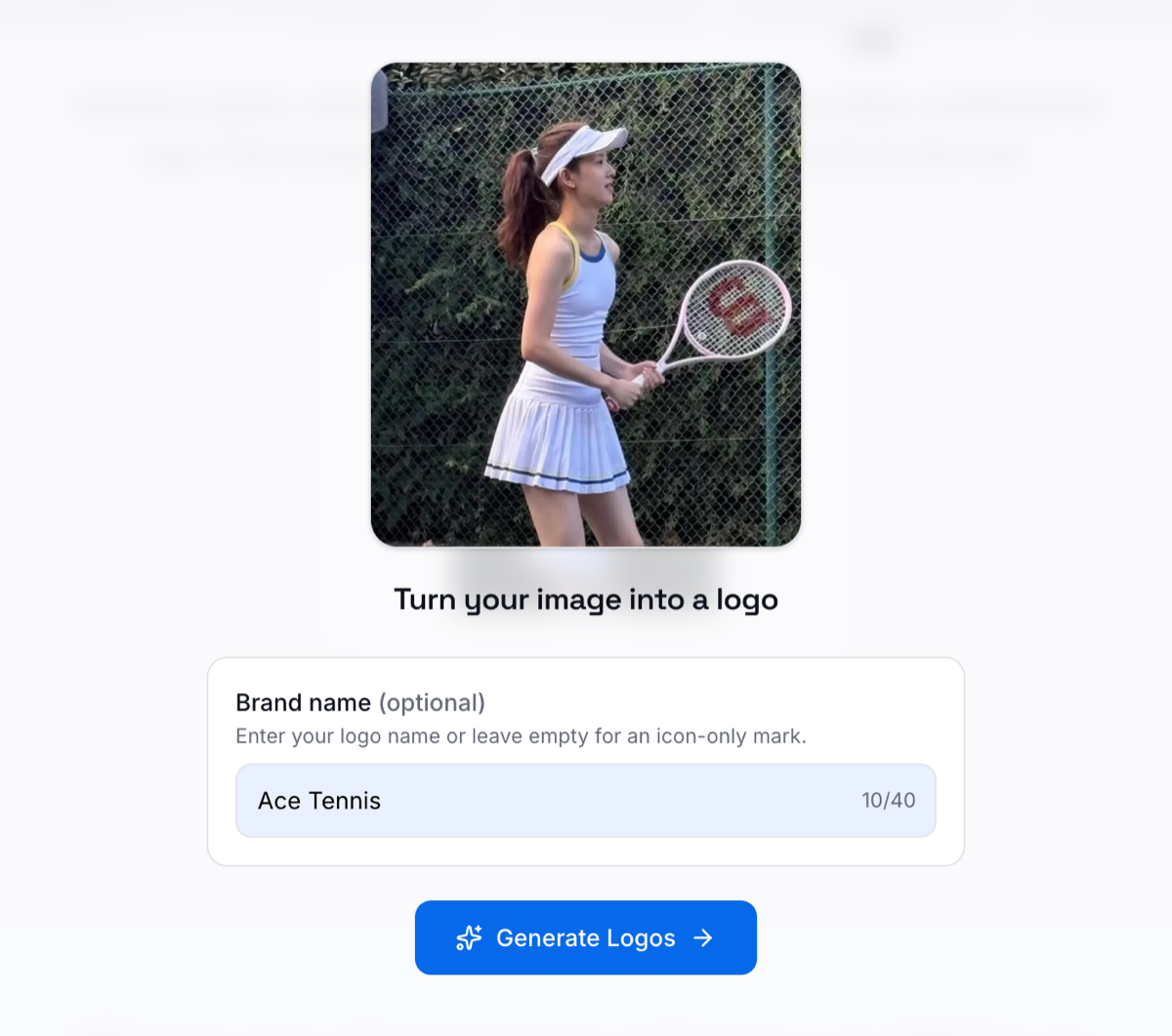
The uploaded tennis photo, with “Ace Tennis” entered as the brand name.
In the screenshot above, my photo is already uploaded and Ace Tennis is entered in the optional brand-name field. Adding a name gives the generated concepts lettering to work with. You can also leave this field empty for an icon-only mark.
Check the name carefully before continuing. For this example, the short name gives the design room for both a player illustration and readable text. Click Generate Logos when you are ready to explore the results.
Step 3: Compare multiple logo ideas
LogoAI uses multiple image models to produce different interpretations. The results below show six Ace Tennis concepts based on the uploaded photo.
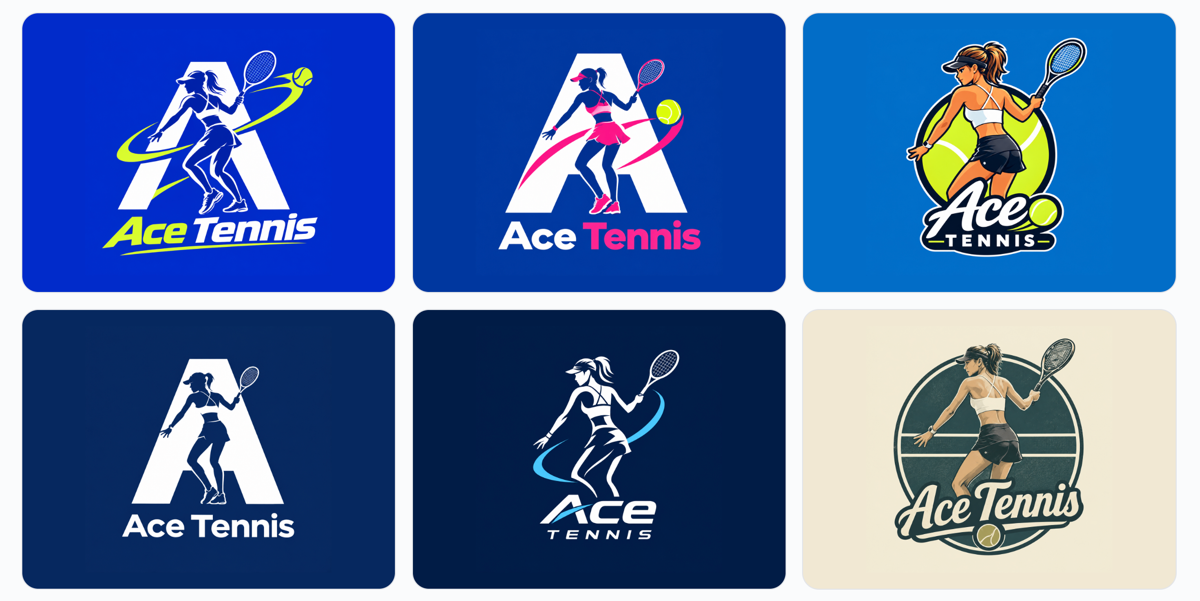
Six logo ideas inspired by the same tennis photo and brand name.
Several designs combine a player with a large letter A, building a connection between the name and the sport. Others put the athlete inside a circular badge or make the player the main feature above the lettering.
The differences are useful when deciding what kind of brand you want:
- Bright blue and lime concepts emphasize energy, with sweeping lines and tennis-ball details.
- The pink-accented version offers a different palette while retaining the letter A and player combination.
- The simpler navy-and-white concept uses fewer colors and a strong central silhouette.
- The cream-and-green badge suggests a more traditional club identity through its circular composition and script lettering.
These are creative directions to evaluate. The generated players do not reproduce the original photo exactly, and the six options should not automatically become six interchangeable brand logos. First, choose the direction that best represents your project.
Step 4: Choose the design that works beyond the preview
A logo can look impressive in a large results card and become difficult to read in a profile picture. Before choosing a favorite, imagine where Ace Tennis would actually appear: a coaching website, a court banner, a shirt, or a social account.
For each candidate, ask:
- Can I read the brand name when the image is small?
- Does the player still look recognizable without fine details?
- Does the color palette fit the audience I want to reach?
- Would the composition fit both a square avatar and a wider layout?
Inspect the lettering, racket, hands, and outlines closely. If an otherwise promising concept contains awkward details, refine those before treating it as finished artwork. For this example, I would shortlist one simple silhouette and one badge, then compare both at realistic display sizes.
Step 5: Build variations from your chosen logo
Once you settle on a base design, create versions suited to different placements. A full logo could work on a website, while a compact symbol might suit a social profile. A single-color treatment may be useful for certain print applications.
Our previous guide, Generate Logo Variations from Your Base Logo (No design skills required), explains how to develop color and layout variations while keeping your identity consistent.
This is the point to move from exploring many ideas to maintaining one recognizable brand. Keep the approved name, core shapes, and visual character consistent as you adapt the design.
If you’re still exploring tools for your project, our comparison of the best AI logo generators can help you consider your options.
Turn your own photo into a starting point
The Ace Tennis example begins with an ordinary moment on court and opens up several branding possibilities. Your starting image could be a pet, a handmade product, a personal portrait, or a rough drawing. Choose something meaningful, compare the results thoughtfully, and refine the strongest direction.
Ready to try it? Upload your image to LogoAI Image to Logo and see how your picture can inspire your next logo design.
Ready to create your own logo?
Turn your brand name into professional logo concepts in seconds with LogoAI.
Generate my logo