Can GPT Image 2.5 Change One Detail Without Changing the Rest?
Can GPT Image 2.5 edit one detail without changing the rest? Compare Image 2.0, Flare and Sunburst by editing precision, speed and pricing.
AI image editing has an annoying problem: you ask it to change one small detail, and it quietly changes several things you never mentioned.
Change a jacket, and the face may shift. Replace a background, and the product can look slightly different. Adjust one object, and parts of the original composition may be regenerated.
For many real editing tasks, that matters more than whether an AI can create a beautiful image from scratch. Once an AI-generated image is already close to what you want, the real challenge is often fixing specific details without starting over.
GPT Image 2.5 is designed to improve exactly this kind of workflow. OpenAI says the new generation offers more precise editing, better reference-image fidelity, stronger consistency across multiple edits, and faster image generation than Images 2.0. Generation latency has been reduced by up to 50%.
So the more useful question isn’t simply:
Does GPT Image 2.5 generate better images?
It’s:
Can it change the thing you asked for without changing everything else?
Why “Change Only This” Is Still Hard for AI
Generating a completely new image gives an AI model a lot of freedom.
Editing an image you already like is different.
The model has to understand two things at the same time:
what should change, and what must stay untouched.
For a product image, you might want to replace the background while keeping the product shape, packaging, label, colors, and branding intact.
For a portrait, you might want to change an outfit without changing the person’s face, expression, pose, or lighting.
For a marketing visual, you might want to adjust one object without rebuilding the composition around it.
In all of these cases, the requested edit itself may be simple. The harder part is preserving everything around it.
A successful AI edit therefore isn’t just about changing the right thing.
It’s also about not changing the wrong things.
That is one of the areas OpenAI specifically emphasizes with GPT Images 2.5. The company says the new model is better at preserving subjects from reference photos and following editing instructions reliably across multiple turns.
What Actually Changed With GPT Image 2.5?
OpenAI introduced GPT Images 2.5 on September 8, 2026, with improvements centered on image fidelity, editing precision, and generation speed.
Images 2.5 is designed to produce more natural lighting and richer textures, while better preserving recognizable subjects and details during edits. It also improves consistency when the same image is refined across multiple turns.
For API users, OpenAI introduced two GPT Image 2.5 models.
GPT Image 2.5 Flare is the faster model. OpenAI describes it as its fastest option for high-quality everyday image generation and recommends it as the default choice for most applications. It is aimed at use cases such as creator content, rapid prototyping, visual search, and higher-volume generation.
GPT Image 2.5 Sunburst is designed for workflows where precision matters more. OpenAI describes it as its most capable model for image generation and editing, particularly for tasks where tighter control across edits is important. The tradeoff is longer generation time.
That makes a focused edit more revealing than simply asking all three models to create a new image.
If GPT Image 2.0, Flare, and Sunburst can all generate attractive results from scratch, the differences may be hard to see.
A targeted edit gives us a much clearer question:
What changed besides the thing we asked to change?
A Simple Test: Change One Detail and Keep Everything Else
The test itself doesn’t need to be complicated.
Start with the same reference image and give GPT Image 2.0, GPT Image 2.5 Flare, and GPT Image 2.5 Sunburst exactly the same instruction.
For example:
Change only the color of the dog’s cap from blue to red. Keep everything else exactly the same, including the dog’s face, expression, fur, background, lighting, camera angle, and the text on the cap.
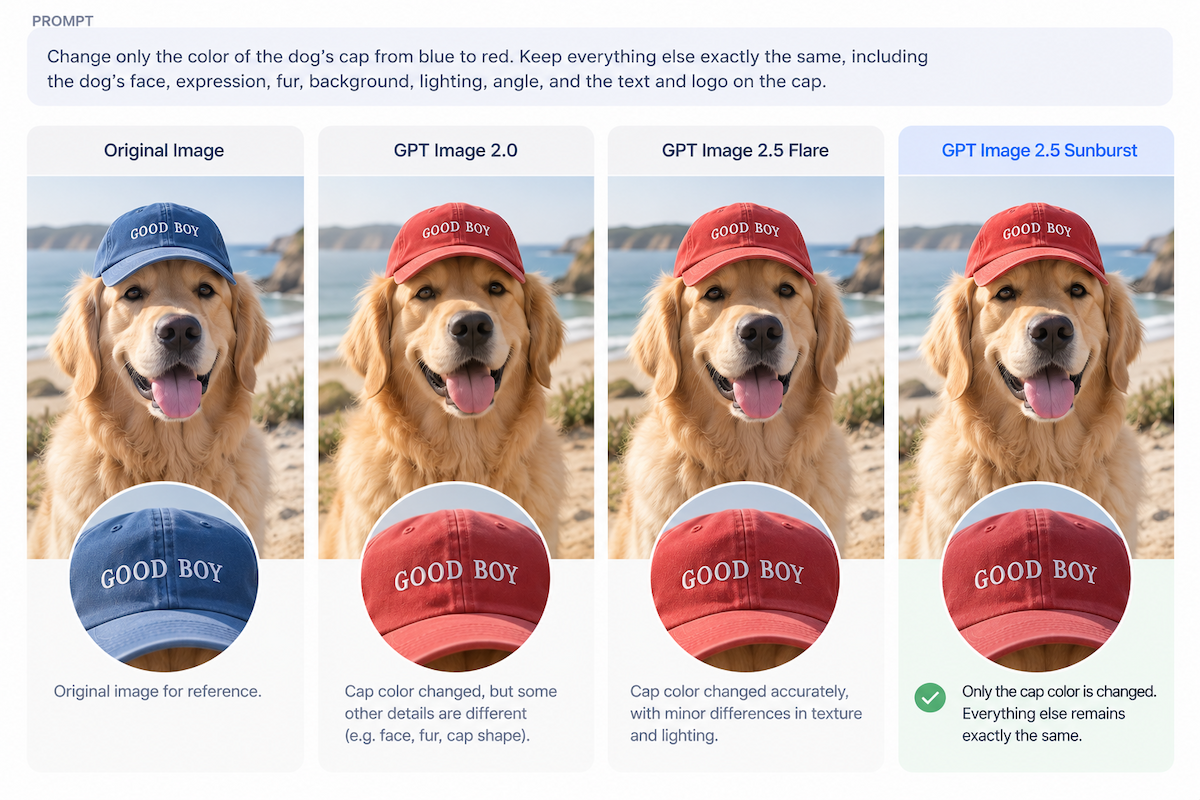
Original → GPT Image 2.0 → GPT Image 2.5 Flare → GPT Image 2.5 Sunburst
The obvious thing to check is whether the cap becomes red.
But that isn’t really the difficult part.
Look instead at everything the prompt didn’t ask the model to change:
the dog’s face, the shape of the cap, its lettering, the fur texture, background details, camera angle, and lighting.
If those details start drifting, the model technically completed the requested edit—but it didn’t fully preserve the original image. When reviewing outputs like these, an AI image detector can also help assess whether an image shows signs of AI generation or manipulation.
That distinction matters because many real image-editing workflows start with an image that is already 90% right.
You don’t want another image.
You want this image, with one thing changed.
GPT Image 2.0 vs Flare vs Sunburst: Which Should You Use?
The practical difference between the three models is less about which one is universally “better” and more about what you are trying to do.
Flare prioritizes faster generation and iteration.
Sunburst prioritizes tighter control when editing precision matters.
GPT Image 2.0 remains useful as the previous-generation baseline.
Interestingly, price does not currently separate them at the published token level. OpenAI lists the same base rates for GPT Image 2.0, Flare, and Sunburst: $5 per 1 million text-input tokens, $8 per 1 million image-input tokens, and $30 per 1 million image-output tokens.
| Model | Best suited for | Main difference | OpenAI API pricing | LogoAI |
|---|---|---|---|---|
| GPT Image 2.0 | Existing workflows or comparison with the previous generation | Previous-generation baseline | Text: $5 / 1M Image input: $8 / 1M Image output: $30 / 1M |
3 credits / generation |
| GPT Image 2.5 Flare | Everyday generation, fast iteration, social content, and exploring multiple ideas | Faster generation | Text: $5 / 1M Image input: $8 / 1M Image output: $30 / 1M |
3 credits / generation |
| GPT Image 2.5 Sunburst | Targeted edits, reference-heavy work, and polished product or campaign visuals | More editing control | Text: $5 / 1M Image input: $8 / 1M Image output: $30 / 1M |
3 credits / generation |
OpenAI’s API pricing is token-based, so there isn’t one fixed cost for every generated image. The final cost varies depending on the amount of text and image input, output size, and quality settings. Flare and Sunburst both support low, medium, high, xhigh, max, and auto quality levels.
So the practical choice is fairly straightforward.
Use Flare when you want to explore concepts, create several variations, generate social content, or simply iterate faster.
Use Sunburst when you already have an image you want to preserve and need to make a targeted edit without unnecessarily altering everything around it.
And if you’re not sure which one will handle a particular image better, specifications only tell you so much.
At the time of writing, GPT Image 2.0, GPT Image 2.5 Flare, and GPT Image 2.5 Sunburst each cost 3 AI credits per generation in LogoAI.
With LogoAI’s ChatGPT Image Generator, you can use the same reference image and the same prompt across different GPT Image models in one workspace, without setting up an OpenAI API integration first.
For precise editing, that may be the most useful comparison of all:
Which model changes only what you asked it to change?
Ready to create your own logo?
Turn your brand name into professional logo concepts in seconds with LogoAI.
Generate my logoReady to create your own logo?
Turn your brand name into professional logo concepts in seconds with LogoAI.
Generate my logo